
Welcome to Biker Mobile, your new SIM should be with you within a week of your order.
Thank you for joining the Biker Mobile Community. We're really pleased you have chosen to use our Mobile Service and in doing so support the Biker Mobile community causes.
Your new Biker Mobile SIM should be with you within a week of placing your order.
In order to get started with your Biker Mobile SIM, we recommend the following steps:
- Request a PAC or STAC from your current provider (if you want to terminate their service)
- Relax and wait for your SIM to arrive
- Download the Biker Mobile App
- Register your account
- Activate your Biker Mobile SIM
- Install Biker Mobile Sim into your device
- Submitting you PAC or STAC
Please refer to the following sections for additional details regarding each step:
1. Request a PAC if you wish to keep your current Mobile Number or Request a STAC if you want to use the number Biker Mobile provides and cancel service with your current provider.
- Keeping your existing mobile number (by requesting a PAC)
- You can request a PAC from your current provider using their SIM in your handset, by texting ‘PAC’ to 65075. Some providers may require additional information -such as your date of birth.
- They should also provide you with a PAC via their self care and/or their support team.
- There is no charge for a PAC, and they will inform you of any termination charges due.
- For more information see our FAQ under ‘How do I Port my number onto Biker Mobile’ & ‘PAC Code and STAC Code: what’s the difference and how do I get one?’
- Cancel previous Mobile Service provider and keep you new Biker Mobile Number (by requesting a STAC)
- If you do not want to keep your current mobile number and wish to cancel your current mobile service provider, you can do this with a STAC.
- You can request a STAC from your current provider using their SIM in your handset, by texting ‘STAC’ to 75075. Some providers may require additional information -such as your date of birth.
- They should also provide you with a STAC via their self care and/or their support team.
- There is no charge for a STAC, and they will inform you of any termination charges due.
- For more information see our FAQ under ‘PAC Code and STAC Code: what’s the difference and how do I get one?’
2. Relax and wait for your new Biker Mobile SIM to arrive
3. Download the Biker Mobile App
You can download the Biker Mobile App from:
Android


Apple


4. Register for your Account
Once you have received your SIM you can use the Biker Mobile App to register your account and activate your SIM.
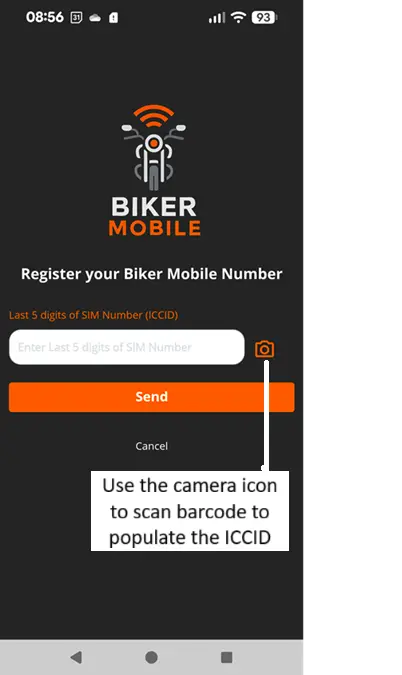
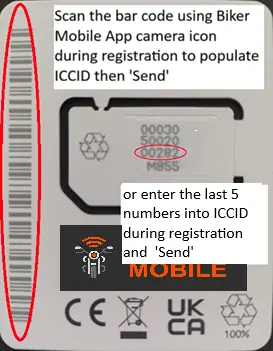
To Register, first enter the email address you signed up with in our sales journey. We will email you a One Time Password (OTP) number which you should enter to proceed. Next, you will need to provide the SIM number (ICCID) of the SIM card you received. There are 2 options to do this:
Option 1
To enter the SIM number (ICCID) you can scan the SIM Barcode using the Biker Mobile app camera icon:
Option 2
Enter the last 5 digits of the ICCID and click Send:
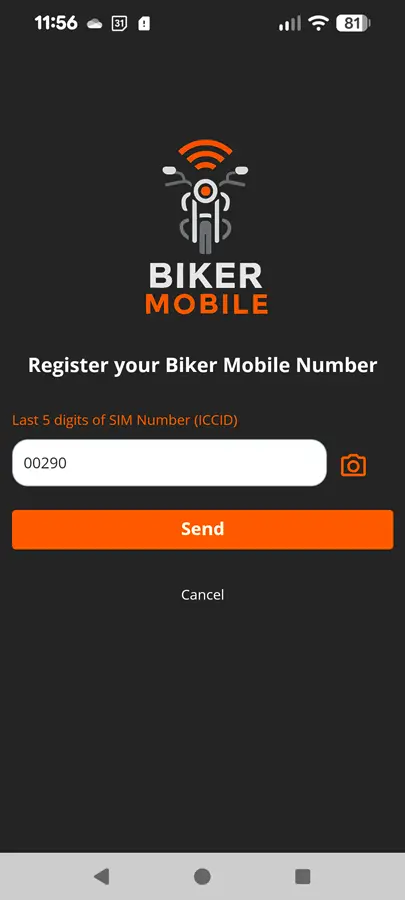
Having entered your ICCID, set your password and marketing preferences, the registration process will be completed, and you will be presented with your Biker Mobile dashboard.
5. Activating your SIM
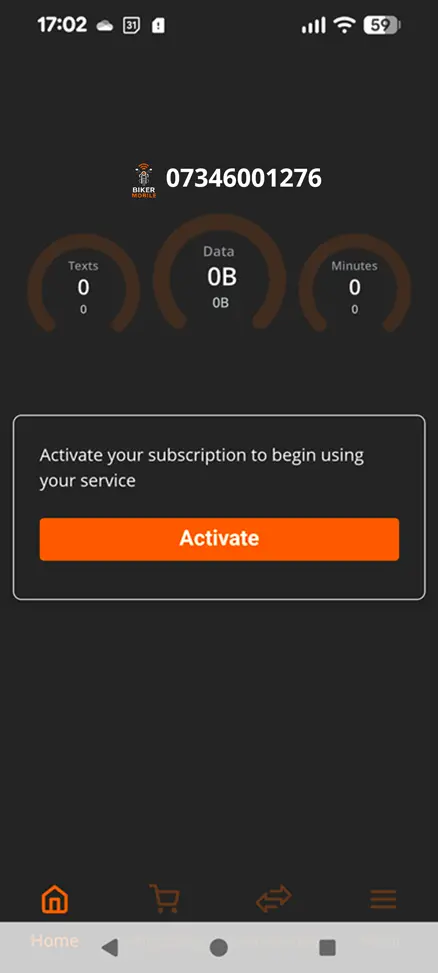
Click on 'Activate' and your Biker Mobile service should be active within 5 minutes - usually quicker than it takes to insert the Biker Mobile SIM into your handset, replacing your old SIM if present.
6. Install your Biker Mobile SIM into your device
Using the SIM pin supplied with your device (sometimes a paperclip will work but care must be taken if not using correct tool) eject the SIM Tray and remove existing providers SIM if you have one and insert the Biker Mobile SIM. It should be clear which way to insert the SIM but if in doubt refer to device manufacturers information.
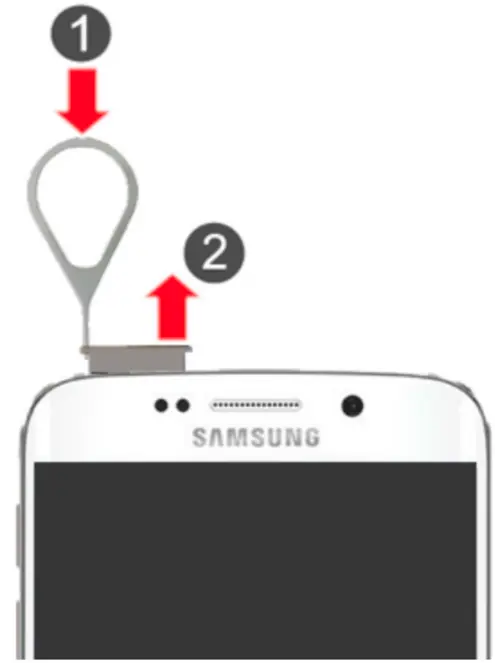
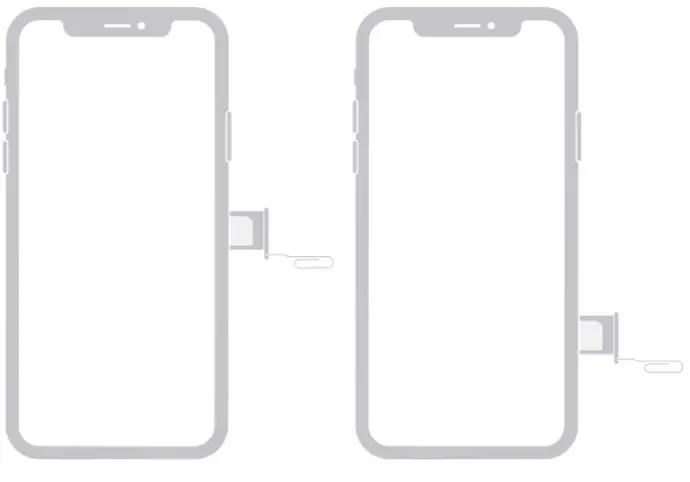
7. Submitting your PAC to bring your mobile number to Biker Mobile or STAC to cancel previous provider service
- Porting with your PAC Code and terminating previous providers mobile service
- When you have completed activation and have your PAC, you can Port in and submit your PAC from the ‘Port In Link’ on the dashboard or navigating from the Menu to ‘Manage my Subscription‘ > ‘Port In’ option in your Biker Mobile App.
- Enter your Mobile number (with current provider), PAC Code) and the date you would like the switch to occur. Please note it needs to be a working day and cannot be the current day.
- Submitting a PAC will terminate the Mobile Service of the provider issuing the PAC
- Terminating previous providers mobile service with STAC and leaving your old mobile number
- When you have completed activation, you can submit your STAC from the ‘Port In Link’ on the dashboard or navigating from the Menu to ‘Manage my Subscription‘ > ‘Port In’ option in your Biker Mobile App.
- Enter your mobile number (with current provider), STAC Code and the date you would like the STAC to occur. Please note it needs to be a working day and cannot be the current day.
- Submitting a STAC will terminate the Mobile Service of the provider issuing the STAC
Additional information
- We won't take your payment for your new mobile service until you choose to activate.
- You can insert your Biker Mobile SIM before Activating if you are using WiFi as your data connection enabling you to activate.
- Note that if you are in contract with your previous provider, either for Airtime or Handset, then you may be subject to Early Termination Fees -check your contract dates and Terms and Conditions. With Biker Mobile, you will not be subject to any Early Termination Fee when leaving.